How to Set Up a CSA on Shopify

Running a CSA is already a full plate. You’ve got the harvest, weather, members emailing twelve hours before pickup because they forgot they’re leaving town. When it comes to selling shares online, Shopify is one of the best tools available: it’s used by over two million businesses, has a massive ecosystem of apps, and gives you a real storefront you can design to actually look like your farm. Your checkout, your branding, your domain, not a generic signup page that looks like everyone else on the platform.
The catch is that Shopify alone doesn’t handle the important CSA-specific pieces: subscription billing, box customization, pickup scheduling, member holds. Here’s how to fill that gap and get it running.
Start with a Shopify store
If you don’t already have one, go to shopify.com and start a trial. You’ll eventually need a paid plan; the Basic plan at $29/month is enough to get started. You don’t need Shopify Plus or any higher tier to run a CSA.
If you already have a Shopify store, you’re ahead. Your CSA members will live right alongside your other customers, which is one of the main reasons to do this in the first place.
A couple of things to set up before you go further:
Your domain. If you don’t have a custom domain yet, get one. Members will be signing up at yourfarm.myshopify.com without it, which looks unfinished. You can buy a domain directly through Shopify or point an existing one from Namecheap, GoDaddy, wherever you already have it.
Payment processing. Shopify Payments is the easiest option and works well for CSA subscriptions. If you’re in the US, it lets you accept cards with no transaction fee on top of Shopify’s cut. If you use a third-party processor, Shopify adds an extra 0.5–2% transaction fee depending on your plan, which adds up over a full CSA season.
Install a CSA app
Shopify doesn’t have subscription support for something as specific as a CSA. It has a basic subscription API that third-party apps can hook into, but is missing the CSA-specific workflow: members choosing their box contents, pickup locations, holding a week when they’re on vacation, communicating this week’s harvest.
You have a few options here:
A general subscription app like Appstle or Bold Subscriptions can handle recurring billing, but they’re built for product subscriptions, not CSA shares. You’ll get billing sorted, but you’ll be duct-taping together the rest of the workflow yourself. Some farms are doing this, but it requires a lot of manual coordination and member support.
Copia is built specifically for CSAs on Shopify. It handles subscriptions, box customization, pickup location management, member holds, and member-facing communication in a single app that sits inside your Shopify store. Your members check out within Shopify and their data will all be there in your Shopify customer list. That’s the setup this post is going to walk through, because it’s the one that actually works end-to-end without a lot of manual work.
Install Copia from the Shopify App Store, then go through the onboarding. You’ll connect your Shopify store, choose your plan, and get access to the Copia dashboard inside your Shopify admin.
Set up your CSA share products
This is where you configure what you’re selling.
In Copia, you’ll create one or more share types. A share is the recurring product a member subscribes to: your weekly full share, your biweekly half share, whatever your CSA looks like. For each share you’ll set:
- The name and price. Keep share names simple. “Vegetable Share” is clearer than “Community Supported Agriculture Regular Family Box.”
- The billing frequency. Weekly, biweekly, and monthly are the most common.
- What’s included. If you have a fixed-box CSA, you can configure the expected contents so members know what to expect each week. If you run a market-style CSA where members choose, Copia handles that workflow too.
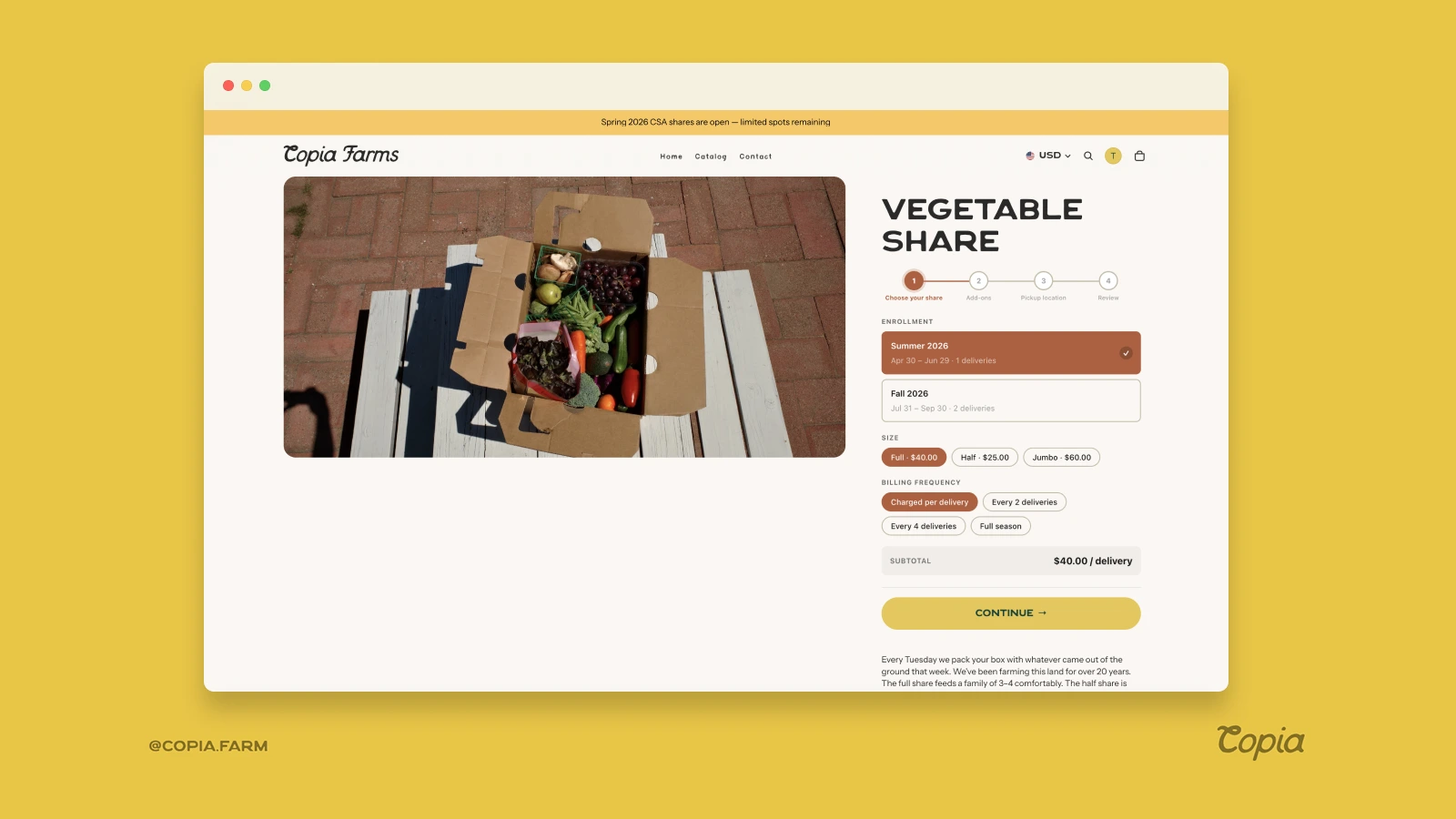
Copia creates the corresponding products in your Shopify catalog automatically. Members see them on your storefront and add them to cart just like any other product.
One thing to decide early: are you taking payment upfront for the season, or billing week-by-week? Upfront payment gives you cash before the season starts and is the traditional CSA model. Week-by-week billing is easier for members to start (lower commitment) but means your revenue comes in gradually. Most farms starting out go with weekly billing because it’s easier to sell, but there’s no wrong answer.
Configure your pickup locations and delivery routes
Most CSAs have at least one pickup location: the farm itself, a drop site, or a farmers market. In Copia, you’ll add each location with the day and time members can pick up.
For each location you can set a member capacity, which matters if you have a drop site that can only handle so many boxes at once. Members choose their pickup location when they sign up, and you can see exactly how many members are assigned to each location when you’re packing for the week.
If you do home delivery, you can set up delivery routes for your drivers in Copia and assign members by address or zip code. Delivery CSAs are more work to manage, but some farms build their whole model around it, especially in urban areas where members don’t have easy access to a pickup site.
Set up member accounts
When a member subscribes through your Shopify store, Shopify creates a customer account for them automatically. They can log in at any time to see their order history.
Inside Copia, members also get access to a member portal where they can:
- Pause or skip an upcoming delivery
- Update their box preferences if you offer customization
- See what’s in their box this week
- Update their payment method
- Switch pickup locations
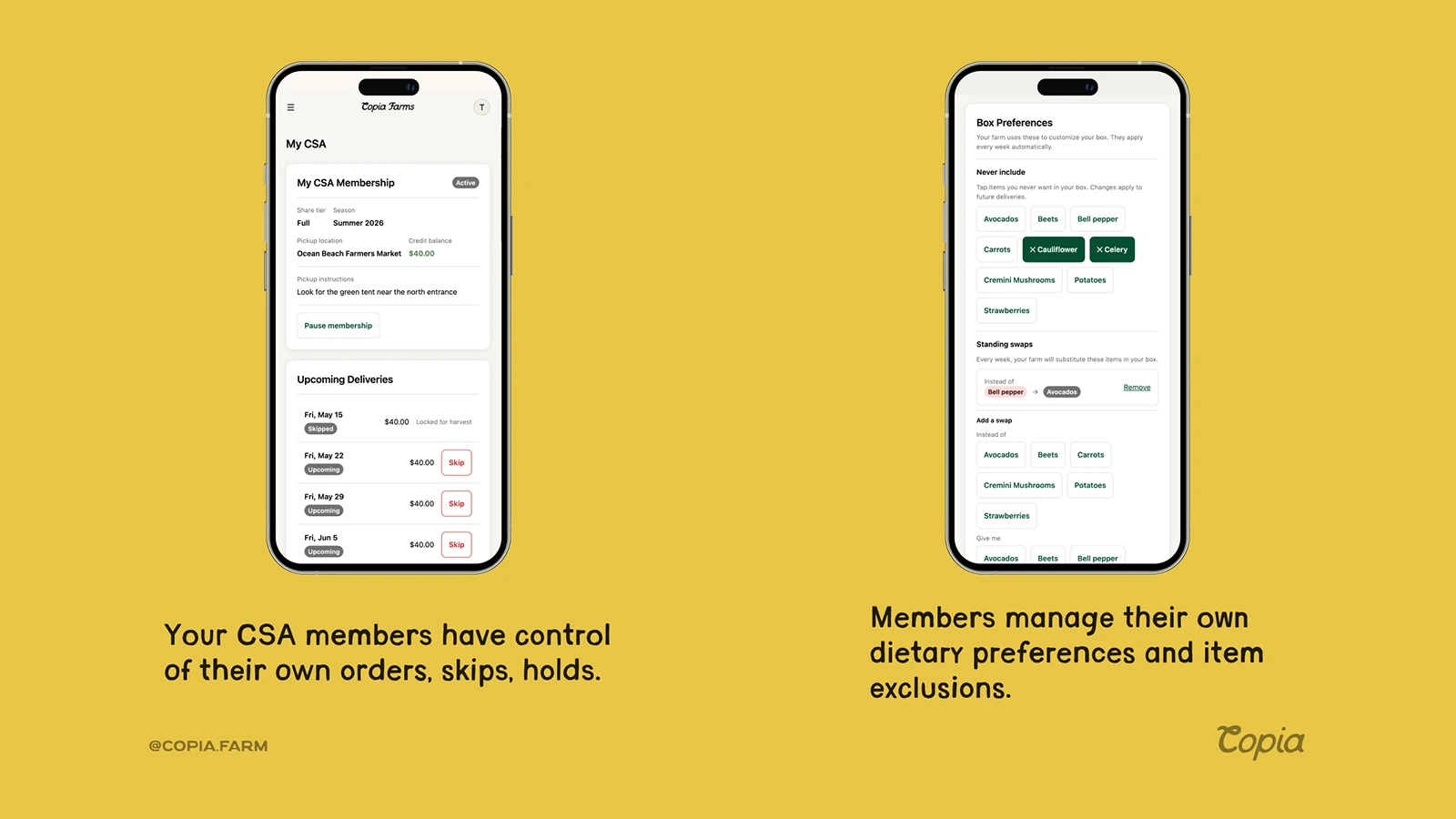
This self-service piece is worth paying attention to. Every farm that doesn’t give members a way to hold their own deliveries ends up fielding the same emails all season long: Can I skip next week? We’re going to be out of town. When members can do it themselves, they do (and they feel better about the subscription because they have control over it).
A few things to sort out before you launch
Member communication. Copia automatically sends members an email each week with what’s coming in their box. You add your harvest notes and it goes out without you having to build anything. For everything beyond that (newsletters, seasonal promotions, general farm updates), you’ll want an email platform connected to Shopify. Klaviyo is the most common choice and has a solid integration. Mailchimp works too. Either one lets you reach your CSA members as a segment without exporting a list.
Holds and cancellations. Decide your policy before members ask. How much notice do you need for a hold? Will you credit the week to their account or skip it? Can members cancel mid-season and get a partial refund? Put this in writing on your signup page so there’s no ambiguity later.
Your first season, go simple. The most common mistake farms make when setting up a CSA on Shopify is trying to get everything perfect before launching. You don’t need box customization, multiple share sizes, and three pickup locations right out of the gate. Start with one share type at one location. Get members in, work through the real problems that come up, and expand from there.
What this looks like on day one
Once you’re set up, a new member lands on your Shopify store, clicks on your CSA share product, picks their pickup location, enters their card, and checks out. The order goes into your Shopify admin like any other order. They show up as a customer in your store. Copia queues them up for their first delivery.
From there, you pack boxes for everyone assigned to each pickup on a given week. Copia shows you exactly who’s active, who’s on hold, and who canceled. Your Shopify store handles the billing automatically on whatever schedule you’ve set up.
The administrative side of running the CSA doesn’t have to be a second full-time job if the system is set up right.
If you’re starting from scratch and want to talk through how this would look for your specific farm setup, reach out at [email protected].
Want to learn more about Copia?
See if our tools can help your farm grow on Shopify. $29/mo locked forever.
View Features