Let members pay in 2 parts
Members pay for half their boxes when they sign up and the rest in one bill partway through the season.
Pay in 2 parts splits a season into two payments. Members pay for the first half of their boxes when they sign up, and for the rest in one bill partway through the season. It’s a middle ground between paying for every box and paying for the whole season upfront.
Turn it on
- Go to Copia → Share Types and click Configure on the share type.
- Under Billing frequencies, tick In 2 parts.
- Click Save.
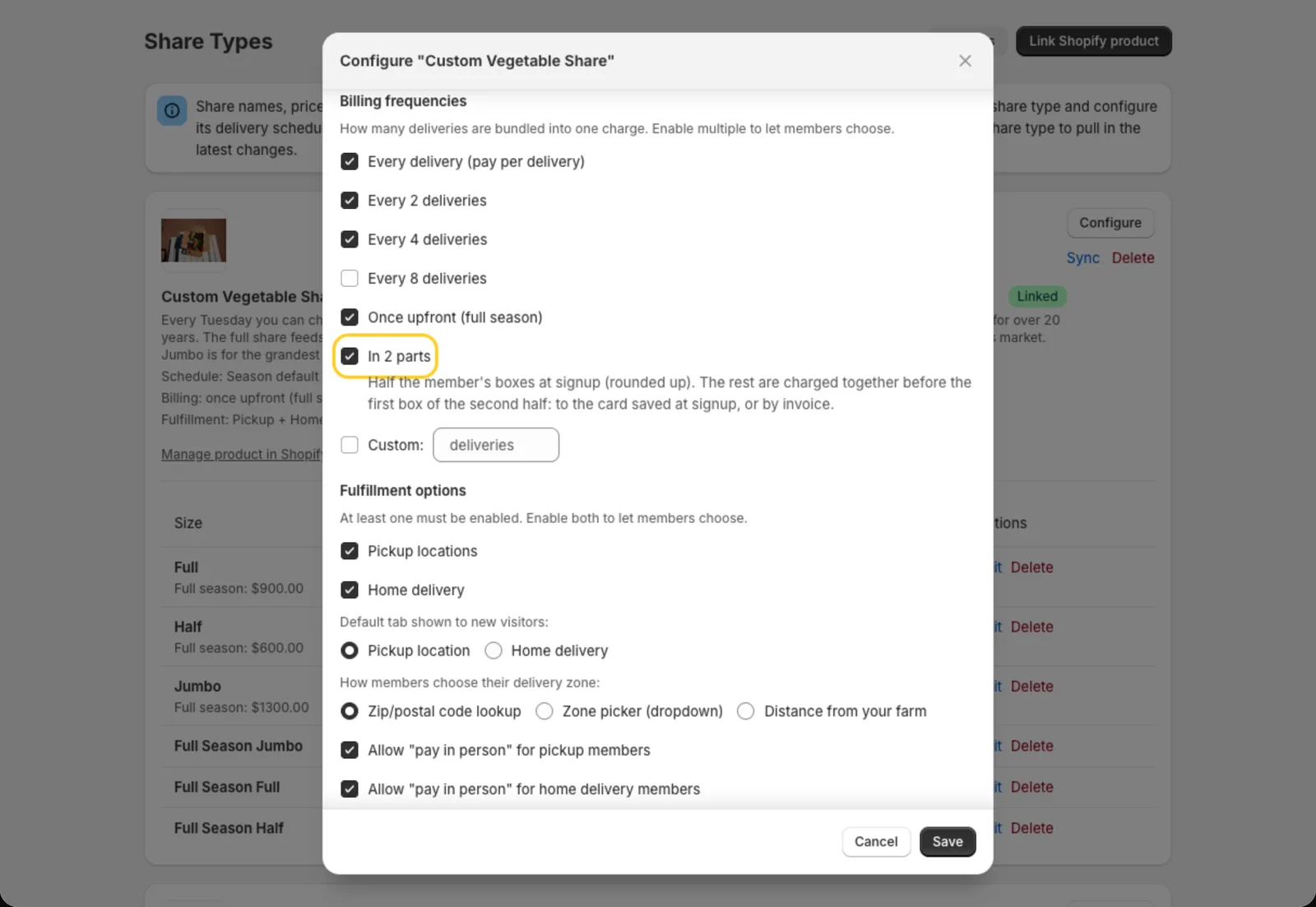
The share type’s card on the Share Types page then lists “in 2 parts” under Billing. You can offer it next to your other billing frequencies, and members pick one.
What members see when they sign up
On the Payment step of your signup form, members paying online see Pay in 2 parts next to your other choices. When they pick it, the total shows both payments, like:
- “$280.00 due today for 7 boxes”
- “Then $240.00 for the other 6, charged to your card before the first of them”
With saved cards off, the second line ends “invoiced before the first of them” instead. Review sums it up: “Pay in 2 parts: 7 boxes now, 6 mid-season”.
Pay in 2 parts isn’t offered to members who pay in person, join the waitlist or take a trial. It’s also not offered on season-priced shares or on year-round seasons, since those have no halfway point.
How the boxes are split
The first payment covers half of the member’s boxes, rounded up. The second covers the rest. It counts the member’s own boxes, so their schedule matters:
- 13 weekly boxes: 7 now, 6 later
- Every other week, 7 boxes: 4 now, 3 later
- Once a month, 4 boxes: 2 now, 2 later
A member who joins partway through the season splits what’s left. Each payment includes the add-ons and delivery fees for those boxes.
How the second half is paid
The second half is billed when you run billing for the first box of the second half. That bill covers that box and every box after it, and the billing preview labels it “Second of 2 parts: this box and the next 5”.
With saved cards on, checkout saves the member’s card. Charge now charges it once for all the remaining boxes, and the member gets a receipt. Shopify then ends that subscription in the member’s account, so there are no more charges. If the card is declined, they get an invoice for those boxes instead, like any declined card.
With saved cards off, the first half is paid through an invoice checkout when they sign up, and the second half is an invoice emailed to them when you run billing.
At checkout, the box line shows the plan, like “Weekly · Pay in 2 parts · 7 now”.
Tip: Shopify’s checkout summary also shows a line like “Recurring subtotal $280.00 every 7 weeks”. That’s Shopify’s wording for a saved-card plan. The card is charged only once more, for the second half.
See who pays in 2 parts
A member’s page shows it under Billing frequency, like “Pay in 2 parts (first 7 boxes paid at signup, the rest in one bill)“.
To move a member off it, click Edit and pick another billing frequency. That ends 2 parts for them, and their unpaid boxes are billed the new way. You can’t switch someone to 2 parts from there: members choose it when they sign up.
Members who pay in 2 parts don’t get the Ask to save card email or the Set up automatic payments button.
Skips
- A second-half box skipped before its bill simply comes off that bill. No credit is added, since it wasn’t paid yet.
- A paid first-half box can be skipped by you from the member page (see Skipping a box that’s already paid). What they paid goes to their credit balance and comes off the second bill.
- Once the second bill is out, members can’t skip those boxes themselves. The portal asks them to contact you.